
Marketing Automation Workflows: From Setup to Scalability (The Complete Implementation Guide)
Marketing Automation Workflows: From Setup to Scalability (The Complete Implementation Guide)
You’ve Bought the Marketing Automation Platform. Now What?
It’s sitting there. Hundreds of dollars per month. Unlimited workflows. Infinite scalability. And your team is staring at a blank canvas wondering where to start.
This is where most automation projects fail.
Not because the platform is bad. Not because the features are insufficient. But because teams jump straight to complexity without understanding fundamentals. They build convoluted workflows before they have clean data. They automate before they understand their customer journey. They layer complexity on top of confusion.
Then six months later, they’ve got 40 workflows running, none of them are performing, and the whole automation initiative feels like a tax on the budget rather than a growth engine.
Here’s what separates the teams that scale automation from the teams that abandon it: they start simple, get it right, then scale systematically.
This isn’t a post about features. It’s a framework for thinking about automation that actually delivers ROI.
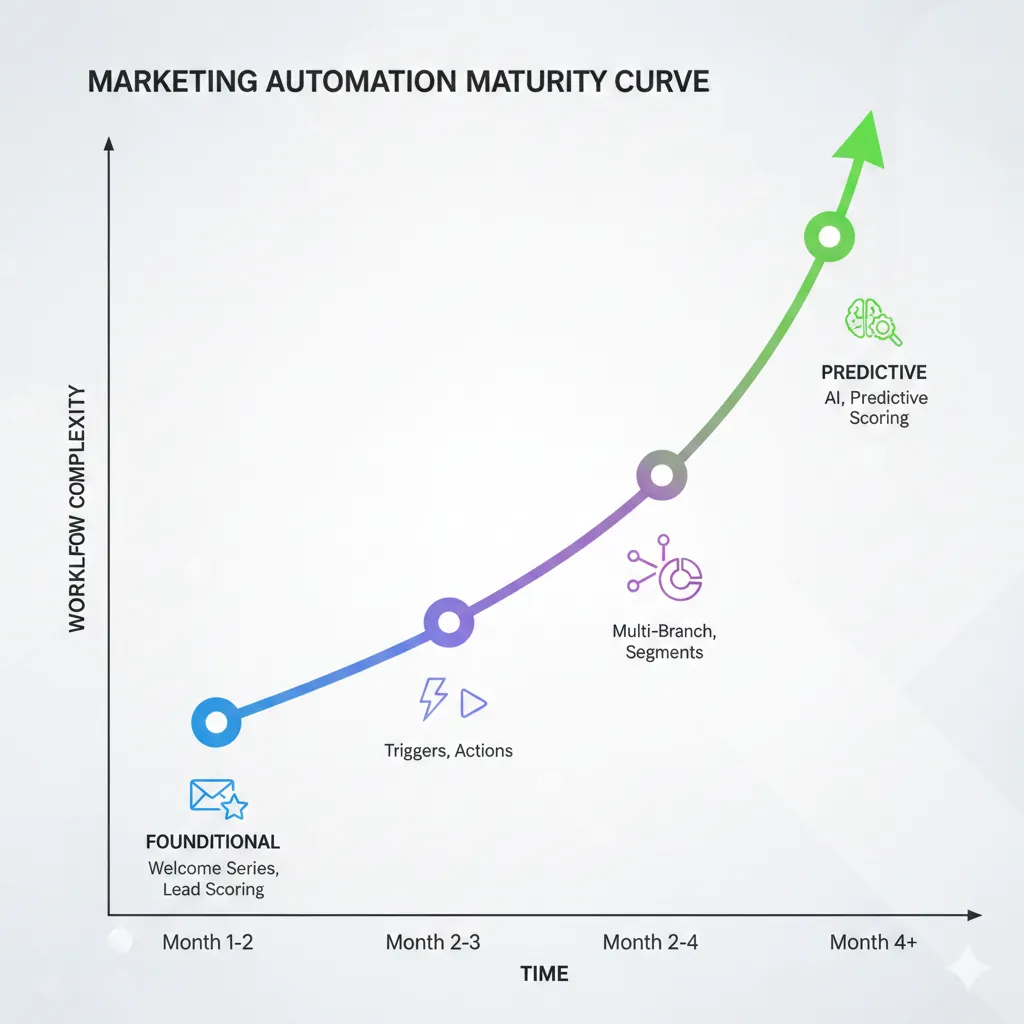
The Automation Maturity Curve: Where Most Teams Get Stuck
Before building any workflow, understand this: automation maturity happens in stages.
Stage 1: Foundational Workflows (Month 1-2) Simple, high-impact automations. Welcome series. Lead scoring. Customer onboarding. These are foundational because they establish clean data and basic processes.
Stage 2: Behavioral Workflows (Month 2-3) Trigger-based automations tied to specific actions. Email after download. Nurture sequence after demo request. Re-engagement for inactive users. These workflows depend on clean data and accurate tracking.
Stage 3: Conditional Workflows (Month 3-4) Multi-branch automations based on behavior, attributes, and engagement. Different paths for different user types. Adaptive messaging based on industry or role. These require sophisticated segmentation.
Stage 4: Predictive Workflows (Month 4+) Automations powered by AI, scoring, and predictive analysis. Churn prediction and intervention. Lead scoring that identifies high-intent prospects. Personalization at scale. These workflows compound as you gather more data.
The mistake: Teams try to build Stage 4 workflows in Week 1. They fail. They blame the platform.
The reality: Build Stage 1 flawlessly. Get it running for 4-6 weeks. Then move to Stage 2. This progression matters.
The Pre-Automation Audit: What You Need Before You Start
Before you touch the workflow builder, audit your current state.
Question 1: Is Your Data Clean?
Bad data is automation’s kryptonite. It amplifies errors. A duplicate email in your database doesn’t just send one extra email—it sends it to thousands of people multiple times.
Audit:
- Do you have duplicate contacts? (Use deduplication tools to find them)
- Are email addresses formatted consistently?
- Do your custom fields have standardized values, or is “high priority” entered as “High Priority,” “high,” “HIGH,” and “PRIORITY”?
- What percentage of contacts have complete key information (email, company, first name)?
Goal: 95%+ data quality before you start automating. Spend a week cleaning if you need to.
Question 2: Do You Understand Your Customer Journey?
Most teams automate without mapping their actual journey first.
Map:
- Where do leads come from? (Ads, content, partnerships, events)
- What’s the first action you want them to take? (Download, webinar signup, trial request)
- What’s the next step? (Nurture, demo, support)
- How many steps until they’re “sales-ready”?
- Where do deals stall? (This is crucial—automation should address stall points)
Don’t guess. Survey your sales team. Look at historical deals. Understand the actual path, not the ideal one.
Question 3: What Are You Measuring?
Before you automate, define success metrics for each workflow:
- Open rate (acceptable: 25%+ for B2B, 15%+ for B2C)
- Click-through rate (acceptable: 3-5% for nurture, 8%+ for transactional)
- Conversion rate (depends on the workflow, but track it)
- Unsubscribe rate (should be <0.5%)
These baselines matter. You’ll improve them, but you need to know where you’re starting.
Question 4: Who Owns What?
Automation only works when someone is accountable:
- Who monitors workflow performance?
- Who updates copy and creative?
- Who analyzes what’s working and what isn’t?
- Who handles edge cases and exceptions?
Unclear ownership = abandoned workflows = wasted investment.
Stage 1: Build Your Foundational Workflows (The Right Way)
Let’s build three foundational workflows that every business needs.
Workflow #1: Welcome Series (The First Impression)
This is your hardest-working automation. A new subscriber or trial user comes in. Your welcome series does the heavy lifting before sales ever touches them.
The structure:
- Email 1 (sent immediately): Welcome + primary CTA
- Subject: “Welcome, [First Name]—Here’s What’s Next”
- Body: Brief introduction, why they made the right choice, one clear next step
- CTA: “View 5 Quick-Start Resources” or “Schedule Your Demo”
- Send time: Immediately (not 3 AM though—use timezone logic)
- Email 2 (sent 1 day later): Social proof + credibility
- Subject: “How [Customer Name] Saved 15 Hours/Month With Us”
- Body: Brief customer story showing result similar to prospect’s problem
- CTA: “Read the Full Case Study” or “See How It Works”
- Purpose: Move from “Is this real?” to “This works for people like me”
- Email 3 (sent 3 days later): Objection handling + education
- Subject: “Common Question: ‘Is It Easy to Set Up?'”
- Body: Address the #1 objection your prospects have (common ones: implementation time, complexity, integration)
- CTA: “Get Implementation Timeline” or “See Setup Guide”
- Purpose: Remove the friction preventing action
- Email 4 (sent 5 days later): Urgency + final push (optional for free trial users)
- Subject: “Your Trial Expires in 2 Days—Don’t Lose Access”
- Body: Remind of value discovered, make upgrade easy, offer support
- CTA: “Start Your Plan” or “Talk to Sales”
- Purpose: Convert or extend trial
What makes this work:
- It’s short (4 emails, not 10)
- Each email has a single purpose
- It addresses the actual decision-making journey
- It’s triggered automatically (no manual sending)
- It respects timing (doesn’t overwhelm)
Execution:
- Use conditional logic: if someone hasn’t opened email 1, don’t automatically send email 2. Wait 2 days, then send a variation.
- If someone clicked a CTA, adjust the next email to be relevant to what they clicked
- Track everything: open rate, click rate, conversion rate for each email
Expected outcomes:
- Email 1 open rate: 35-50%
- Email 4 conversion rate: 5-15% (depending on price and product)
Workflow #2: Lead Scoring (Qualifying at Scale)
Lead scoring is automation that your sales team will actually thank you for. Instead of them chasing cold leads, you’ve pre-qualified and ranked them.
The mechanism:
Points accumulate based on behavior and attributes:
Attribute-based points:
- Company size: Enterprise (+10), Mid-market (+5), SMB (0)
- Industry match (your ideal customer): Yes (+5), No (0)
- Title relevance: Buyer (+10), Influencer (+5), Just browsing (0)
Behavioral points:
- Email open (+1 per open, max 5)
- Email click (+2 per click, max 10)
- Page visit to “demo page” (+5)
- Downloaded resource (+3)
- Webinar attendance (+10)
- Form submission for consultation (+15)
- Visited pricing page 3+ times (+8)
Decay:
- No engagement in 30 days: remove 5 points
- No engagement in 60 days: remove 10 points
(Decay ensures old leads don’t artificially inflate scores)
The output:
- Score >50: “Sales Ready” — hand to sales immediately
- Score 30-50: “Nurture Track” — continue automated nurture
- Score <30: “Early Stage” — stay in educational content
Implementation:
- Build this in your automation platform (HubSpot, Marketo, ActiveCampaign all support this)
- Update the scoring rules quarterly based on what actually converts
- Show sales the scoring logic (they need to trust it)
Why it works: Sales no longer guesses who to call. They get notified when leads are ready. Lead follow-up time drops from 48+ hours to minutes. Conversion rates jump.
Workflow #3: Onboarding (Activation After Purchase)
This is the workflow that determines customer success.
The structure (7 days):
- Day 1: Congratulations email + login credentials + quick start guide
- Day 2: First-value checkpoint — “Have you set up [key feature]?”
- Day 3: Educational content — how top customers use the platform
- Day 5: Check-in — “Need help getting started?” (offer support)
- Day 7: Milestone celebration — “You’ve accomplished [X]”
The conditional branches:
- If they logged in day 1: send advanced education
- If they haven’t logged in by day 2: send “here’s why this matters” + 1-on-1 setup offer
- If they completed key setup: congratulate + suggest next feature
- If they’re stuck: auto-route to support
Why it works: First-week activation is the strongest predictor of retention. Automating this means every customer gets a personalized onboarding path based on their actual progress, not generic timings.
Expected outcomes:
- 70%+ should complete key setup by day 7
- Support ticket volume should drop (because automation answers common questions)
- Churn should improve (engaged customers are retained customers)
Stage 2: Behavioral Workflows (The Response Loop)
Once Stage 1 is solid, add behavioral workflows. These trigger based on specific actions.
Example: Download Nurture Series
Trigger: Someone downloads a resource (e.g., “The Ultimate Guide to Marketing Automation”)
Workflow:
- Immediately: Send download confirmation + access to PDF
- 1 hour later: Follow-up email with 3 related resources
- 1 day later: “Did the guide answer your questions?” survey
- If “yes”: Send thank you + invite to webinar
- If “no”: Auto-route to sales for conversation
- 3 days later: Offer consultation or trial
This workflow is automated, but it responds to the actual behavior. Someone who didn’t download doesn’t get this series. Someone who did gets a personalized journey.
Example: Re-Engagement Series
Trigger: Contact hasn’t opened an email in 60 days
Workflow:
- Email 1: “We miss you—here’s what’s new”
- Email 2: “Still interested? Here’s a 50% discount”
- Email 3: “Last chance—removing you from list”
- Final step: If no engagement after 3 emails, pause all marketing until they re-engage
This prevents list decay and respects people’s inboxes.
Stage 3: Conditional & Dynamic Workflows (Intelligence at Scale)
Once you’re confident with behavioral workflows, layer on complexity.
Example: Account-Based Marketing (ABM) Workflow
Trigger: Contact from target account visits website
Workflow:
- Identify: Is this contact from an account on our ABM target list?
- If yes: Create task for ABM team + trigger specialized content
- If no: Continue normal nurture
This requires data (ABM list) and logic (account identification), but it’s powerful—you’re treating high-value prospects differently.
Example: Adaptive Content Based on Industry
Trigger: Lead qualifies as “sales ready”
Workflow:
- Identify: What industry are they in?
- Healthcare: Send healthcare-specific case study + healthcare compliance guide
- Finance: Send finance-specific demo + security documentation
- Tech: Send technical documentation + API reference
Same person, different content based on their context. That’s personalization at scale.
The Scaling Principle: Don’t Add Complexity Until You Can Measure
Here’s the rule that separates successful automation from abandoned automation:
Don’t build a new workflow until you’ve optimized the previous one.
This is hard. It feels slow. But it’s right.
If you build 10 workflows simultaneously and 7 underperform, you won’t know which ones are broken or why. You’ll abandon the whole project.
If you build 1 workflow, optimize it obsessively until it’s working perfectly, then build the next one—you’ll compound improvements and maintain momentum.
The rhythm:
- Week 1-2: Build workflow + monitor basics
- Week 3-4: Analyze performance + test variations
- Week 5-6: Optimize based on data
- Week 7-8: Document the winning version + handoff
- Week 9-10: Build next workflow, repeat
The Dashboard: What You Actually Need to Monitor
Don’t drown yourself in metrics. Monitor these:
For each workflow:
- Emails sent (volume)
- Open rate (% who opened)
- Click rate (% who clicked)
- Conversion rate (% who took desired action)
- Unsubscribe rate (should be <0.5%)
- Bounce rate (should be <1%)
Trends:
- How are open rates trending week-over-week?
- Which email subject lines get highest open rates?
- Which CTAs get highest click rates?
- At what point in the sequence do people drop off?
Business impact:
- How many leads did this workflow generate?
- How many qualified leads?
- Revenue attributed to this workflow?
That’s it. Don’t track 47 metrics. Track these 10. Make decisions based on them.
Common Implementation Mistakes (And How to Avoid Them)
Mistake #1: Not Segmenting Your Audience
Sending the same welcome series to brand-new leads and existing customers is lazy automation that breaks trust.
Solution: Segment on entry. “Is this a new lead or existing customer?” Route accordingly.
Mistake #2: Ignoring Unsubscribe Rate
If unsubscribe rate climbs above 1%, you’re sending too much, sending irrelevant content, or sending at bad times.
Solution: Monitor weekly. When it spikes, audit the workflow that triggered it. Something is broken.
Mistake #3: No Conditional Logic
If someone already bought, they shouldn’t get “buy now” emails. If someone clicked on a link, the next email should be relevant to what they clicked.
Solution: Use if/then branching. One email per behavioral path.
Mistake #4: Not Testing Subject Lines
Subject lines determine opens. Opens determine everything else.
Solution: A/B test every email. Compare “Action required by 2026” vs “Quick question?” Track which performs better. Use winners in future emails.
Mistake #5: Sending Too Frequently
Every platform lets you build 10-email sequences. Just because you can doesn’t mean you should.
Solution: Start with 4 emails. Measure performance. Add more only if engagement doesn’t drop.
Mistake #6: Not Updating Based on Performance
You build a workflow, it runs for 6 months unchanged. Performance decays.
Solution: Quarterly audits. What’s underperforming? What’s working? Update the winners. Retire the losers.
The Data Foundation: Why Clean Data Compounds
Remember we said data cleanup is foundational? This is why:
Bad data day 1: Email to duplicate contact = 2 emails sent, 1 unsubscribe
Bad data month 1: 100 duplicates × 20 workflows = 2,000 duplicate emails = reputation damage
Bad data year 1: ISP deliverability suffers = emails go to spam folder
You can’t A/B test your way out of bad data. You have to fix the foundation.
Spend the time. Clean the database. Deduplicate. Standardize fields. Validate email addresses. It’s boring. It compounds massively.
The ROI Calculation: When Does Automation Pay for Itself?
Let’s be clear about the math.
Cost:
- Platform: $500-2,000/month
- Implementation: 40-80 hours (let’s say $5,000-10,000)
- Ongoing management: 10 hours/week
Benefit:
- Faster lead follow-up (earlier conversion)
- Higher-quality lead qualification (sales efficiency)
- Improved customer retention (onboarding automation)
- Reduced manual work (team capacity freed)
Real outcome: A mid-market company implementing automation effectively typically sees:
- 30% improvement in lead response time
- 25% increase in conversion rate
- 15% improvement in customer retention
- 10 hours/week saved by marketing team
That’s approximately $50,000-100,000 in first-year value for a $10,000 investment.
That’s 5-10x ROI in year one.
But only if you execute thoughtfully. Badly executed automation produces negative ROI (frustration + cost without results).
From Setup to Scale: The 12-Week Implementation Timeline
Weeks 1-2: Preparation
- Audit data, clean database
- Map customer journey
- Define success metrics
- Select platform
Weeks 3-4: Build Foundation
- Welcome series workflow
- Lead scoring workflow
- Onboarding workflow
Weeks 5-6: Optimize
- Test email variations
- Refine lead scoring rules
- Measure baseline results
Weeks 7-8: Add Behavioral Layer
- Download nurture series
- Re-engagement series
- Abandoned cart (if applicable)
Weeks 9-10: Optimize Round 2
- Identify which workflows underperform
- Update underperformers
- Document winners
Weeks 11-12: Build Advanced Layer
- Conditional workflows
- Industry-specific paths
- Advanced segmentation
Post-week 12: Scale & Refine
- Quarterly audits
- Continuous testing
- New workflow additions based on learnings
The Team Piece: Who Manages Automation (Hint: It’s Not One Person)
Automation needs stewardship. Unclear ownership = poor performance.
The automation trio:
- Strategy owner (Usually marketing director)
- Defines which workflows matter
- Reviews performance
- Makes optimization decisions
- Execution owner (Usually marketing coordinator/specialist)
- Builds workflows
- Monitors daily performance
- Tests variations
- Documents processes
- Content owner (Usually copywriter)
- Writes subject lines
- Writes email body copy
- Tests messaging variations
- Ensures brand consistency
All three need to talk weekly. Weekly 30-minute sync = massive performance lift.
The Future: From Automation to Personalization
Here’s what comes after you master automation: personalization at scale.
Once you have clean data flowing through automated workflows, you can layer on:
- Dynamic content (change email content based on industry, company size, behavior)
- Predictive sending (send emails at optimal time for each individual)
- AI-powered subject lines (test hundreds of variations, pick winners)
- Predictive lead scoring (machine learning identifies who’s likely to buy)
But these are advanced features. Master the basics first.
The Takeaway: Start Simple, Execute Well, Then Scale
The teams winning with marketing automation aren’t the ones with the fanciest features. They’re the ones who understood fundamentals, executed them flawlessly, and then layered on complexity.
Start with a clean database. Build a welcome series that actually works. Add lead scoring that sales trusts. Get those three workflows running perfectly for 2 months. Then add behavioral automations.
Move too fast and you’ll abandon the project. Move too slowly and you’ll lose momentum. The sweet spot is methodical, measured progression.
Automation isn’t a project with an end date. It’s an engine that compounds. The longer you run it, the smarter it gets, the more value it produces.
But only if you build the foundation right.
What’s Next?
Audit your current state. Are you ready for automation?
If yes: Start with the welcome series. Get it perfect. Measure results for 4 weeks. Then add the next workflow.
If no: Do the data cleanup first. It takes a week. It’s worth it.
Once automation is working, every hour you invest scales across thousands of prospects. That’s the power of systematic workflow design.
The question isn’t “Should we automate?” It’s “How do we do it right?” Start with that mindset, and the rest follows.